CASIO ClassPad fx-CP400 Pocket Graphing Calculator, Black (FX-CP400)
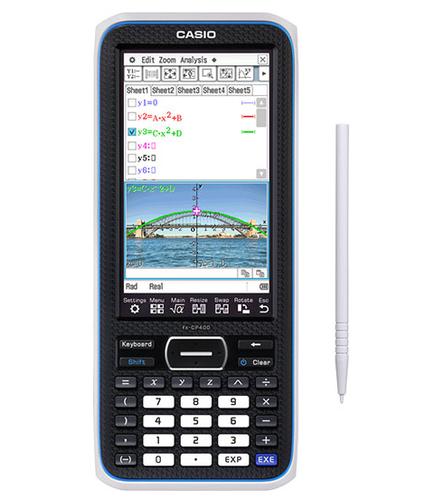
Product images are illustrative. The original product may vary, so please refer to the product specifications in the product description.
Price
€ 224.70The e-shop price may differ with shops price.
Points  +224
+224
Delivery time and options
-
 6-8 days
 -
 6-8 days
 -
 6-8 days
 -
 6-8 days
 -
 6-8 days
Instalments
 from € 6.36 /per month

Product details
| Product code | FX-CP400 |
| EAN | 4549526611926 |
Product description
Equipped with a high-resolution 4.8-inch large touch-panel LCD, the fx-CP400 provides clearer images of mathematical data for students, as well as a better way to comprehend the relationships between their equations and graphs since the calculator can display both at the same time. Also, with the touch of a button, the fx-CP400 can switch from a vertical view to a horizontal view, which is convenient for displaying long mathematical formulas on a single line. Both of these capabilities make it easier for students to grasp difficult mathematical concepts.
- High-Resolution Color LCD
- Powerful Graphing Functions
- Large Touch Panel
**Beautiful 4.8-inch display**
**For richer mathematical expression**
The new fx-CP400 is the first in the ClassPad series to be equipped with a color display. It also boasts resolution 4.4 times higher than the previous ClassPad. The large color LCD makes it easy to observe mathematical formulas, graphs, and images, realizing more comfortable operation.
**Real-time color link**
When you change the color of character data in the spreadsheet, the color of the same data will automatically be changed in the chart window, and vice versa.
**Upright? Horizontal? Both!**
**One-touch switching between upright and horizontal view**
Switching the display between upright and horizontal view is simplicity itself – just tap the icon on the control panel! The horizontal view is particularly convenient for displaying a long formula on a single line.
**View Graphs Horizontally**
**The rotation function now also works with the graph application**
Use of horizontal display, coupled with the ClassPad’s large screen, allows a graph 1.7 times larger than previous versions to be displayed.
**Horizontal Display of Graph and Formula Together!**
**Dual-Window Display now also supports Horizontal View**
Dual-Window Display, which splits the screen into top and bottom sections, now also supports Horizontal View. The ability to check a graph and formula together even during Horizontal Display will surely deepen understanding of the relationship between the two elements.
**Touch panel**
**Large, color LCD touch panel makes viewing and operation super smooth**
The fx-CP400 offers intuitive operation through use of the stylus on the touch panel. Mathematical formulas can be graphically displayed without any complicated key operations – simply drag and drop the formula into the graph area!
**Brand-new software keyboard**
**Offers three levels of proficiency**
Offers the full range, from the basic functions that everyone uses, such as fractions, square roots, and trigonometric functions, through to advanced functions such as differential calculus, complex compound numbers, and sigma calculations, and then on into even more advanced calculations including piecewise and user-defined formulas.
**New mathematical features**
For a deeper understanding of mathematics
**New stylus storage**
Push-latch mechanism
Stylus is kept in place by a push-latch mechanism.
**New hard keys**
Incredibly easy to operate
The fx-CP400 is fitted with keys that are slanted vertically, helping to prevent input errors when pressing vertically arranged keys.
**100-hour battery life**
From a readily available dry-cell battery
Spare batteries can easily be obtained and carried with you. Further, rechargeable dry-cell batteries are available.
**USB mass-storage**
No special software required for data transfer
A USB mass storage function allows for quick and easy transfer for data. USB cable supplied.
**Direct projector connection**
All you need are the ClassPad II(fx-CP400) and a data projector
Compatibility with Casio data projectors enables the ClassPad's display to be easily projected up onto a screen.
**Practical and stylish design**
**Solid body with appealing, slightly ovular shape**
Fits comfortably in the hand, and finished in several shades of blue to evoke an intellectual look.
**Data logger connection**
A variety of experimental data valuable in classes can be extracted through the connected sensor.
Extracted data can be analyzed by transferring it to the graph function calculator. Casio ClassPad fx-CP400. Form factor: Pocket, Type: Graphing. Backlight display. Profit calculation. Power source: Battery. Product colour: Black